What you already have
The invoicing software
It solves the other side: issuing and bookkeeping. It takes for granted that the expense already comes justified.
Verigastu · In testing · Self-employed in Spain
Verigastu is the expenses app for the Spanish self-employed: you photograph the receipt, you say why it is deductible, and it builds your expenses ledger and the dossier in case the Spanish Tax Agency (Hacienda) comes asking. This page sells nothing: it shows you the app from the inside. Eight real screens, in order, from the receipt in the café to the dossier you download. No sign-up, no email, no form.
The screenshots are of the app running, not mock-ups, and they were taken in early September 2026: some screens have changed since then. The data shown belong to a fictitious self-employed woman created for the demonstration.
Before you look any further: Verigastu does not issue invoices and is not Verifactu invoicing software. It is the ledger of your expenses – the invoices you receive. If what you are looking for is software to issue your invoices, this is not what you need: we explain the difference here.
The problem
A coffee with a client and a Sunday coffee produce exactly the same piece of paper. What separates them is an explanation that almost nobody writes down at the time and nobody remembers six months later.
This is not our opinion. The law says that an invoice "no constituye un medio de prueba privilegiado respecto de la existencia de las operaciones" (is not a privileged means of proof of the existence of the transactions) and that, if the tax authorities challenge it on reasonable grounds, "corresponde al obligado tributario aportar pruebas sobre la realidad de las operaciones" (it is for the taxpayer to provide evidence that the transactions were real). Having the receipt is the beginning, not the end.
Burden of proof: art. 105.1 LGT · The invoice is not privileged evidence: art. 106.4 LGT · Correlation with income: art. 28 LIRPF, by reference to art. 10.3 LIS
What you already have
It solves the other side: issuing and bookkeeping. It takes for granted that the expense already comes justified.
What is missing
Written while the paper still has context, not next year in front of an information request.
Where Verigastu comes in
It captures the reason, not just the amount. And turns it into a ledger and a defensible dossier.
The tour · 8 real screens
Scroll down slowly: the screen on the left changes with each step.
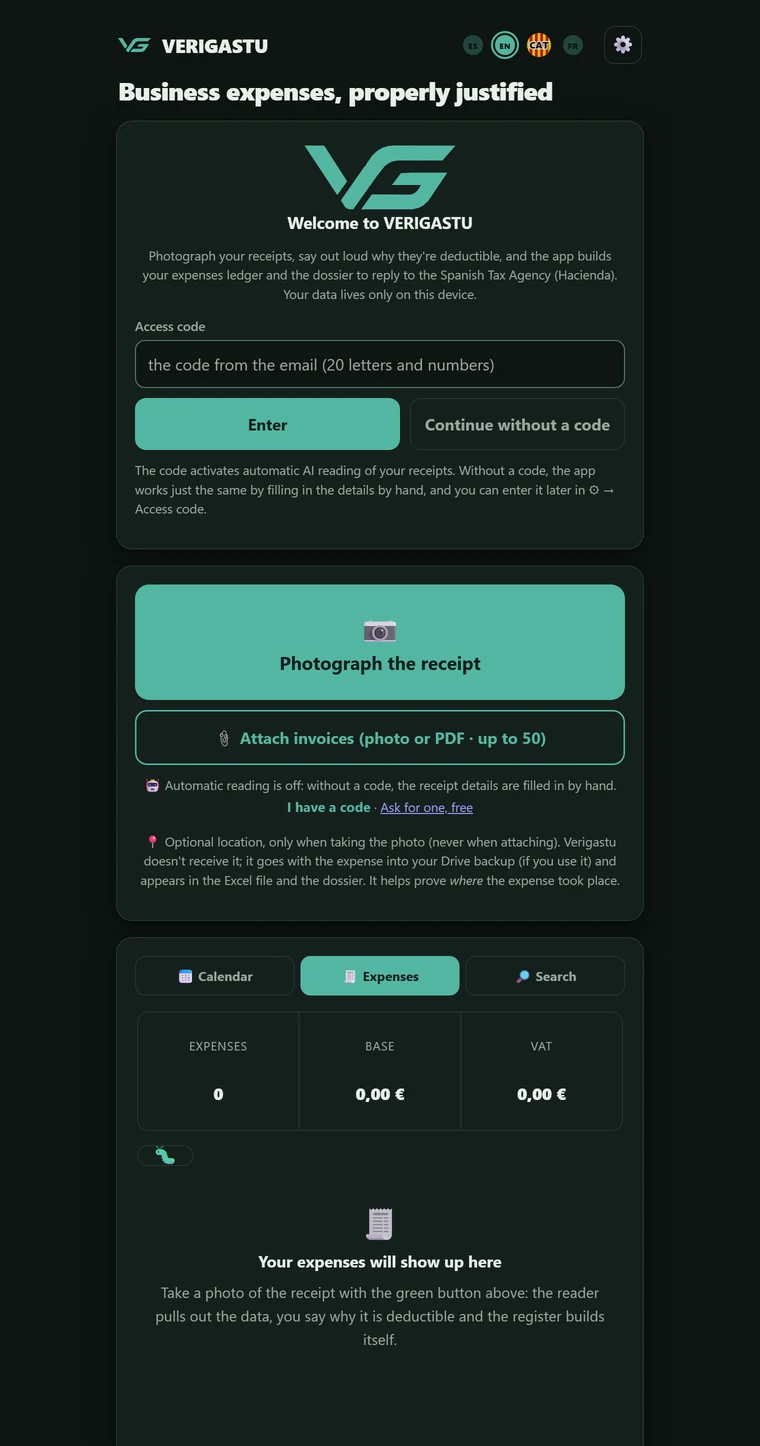
There is no sign-up, no passwords, no "continue with Google": your code acts as your account. The access code reaches you by email with a link that already carries it: you open it on your phone and you are in, without typing anything. If you open the app some other way, the first screen asks you for the code, which also comes on its own in the email. On our server, that code appears without your name or your email address: it is what switches on automatic reading with AI.
And you can get in without one. "Continue without a code" leaves the whole app working by hand, with you filling in the data yourself.
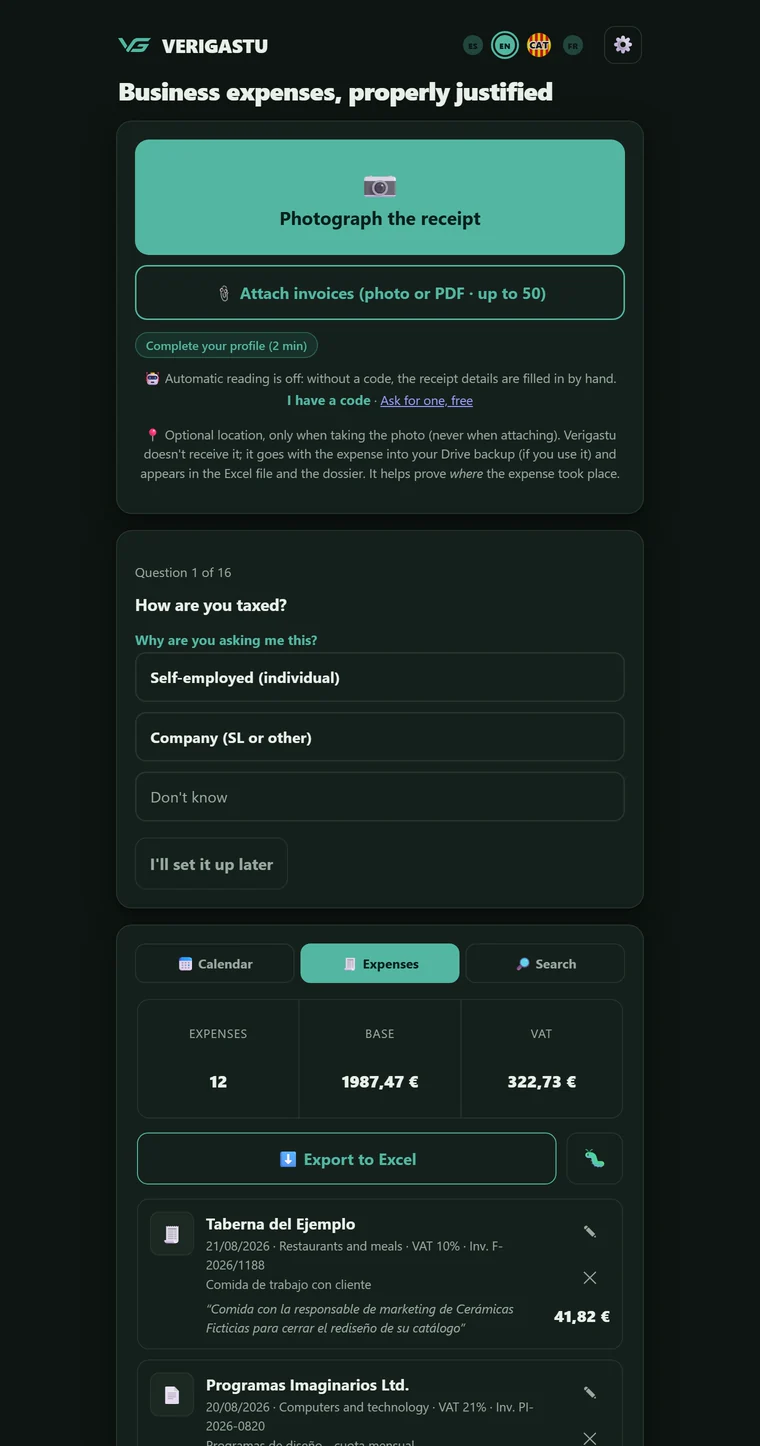
The first time you get in, the app only asks two things: how you are taxed and which VAT scheme you are on; the second is the one that changes the numbers most. Then, straight to the camera. The rest of the profile – whether you work from home and how many square metres, whether you have a vehicle, whether you have employees, whether you apply the general VAT pro rata… – waits in ⚙ → My tax profile. They are not filler questions: some change the calculations (the pro rata, the square metres of your home); others fine-tune the warnings.
Anyone on the equivalence surcharge sees their input VAT at zero, because that is what applies. Anyone working from home sees, in the warning itself, what share of the electricity or Internet bill the law sets for their case – 30 % of the proportion of square metres they declare as used for the business, art. 30.2.5.ª b) LIRPF – and that the law allows another percentage to be proved. And each question explains, if you tap it, which calculation it changes and on what legal basis.
Another is how many business activities you are registered for. If it is two, three or four, the app asks you for the name and the IAE heading of each one, and from then on every expense knows which one it belongs to. With a single activity it never asks again: the normal case does not pay the price of the rare one.
For the ledger in the AEAT format, the app also asks for the code, the type and, where applicable, the heading of each activity, and lets you look it up by its description in the copy of the AEAT list of activities it carries inside. And if you enter your name and your NIF, the explanatory report and the ledger say whose they are, and the files carry your NIF in their name. All of that is optional.
The big button opens the camera. You can also attach a PDF – the whole file, even if the invoice runs to five pages – or drop up to fifty invoices in one go as a batch. On Android, with the app installed, they can also reach it from another app – email, WhatsApp, a PDF viewer – through the Share button: the app shows you what it received and does not import it until you say so.
As soon as you take the shot, and before any form appears, the app asks: "Why is this expense deductible? Say it now, while it's fresh". You answer by speaking or, if you would rather not talk to your phone in front of anyone, by typing: the same box takes both, and you can also leave it empty and complete it later from the expense itself. Dictation is transcribed by the speech recognition of your own browser or phone, just like when you dictate a message; only the text ever reaches Verigastu, never your voice. All of that while the AI reads the receipt in the background. There is no waiting for anything.
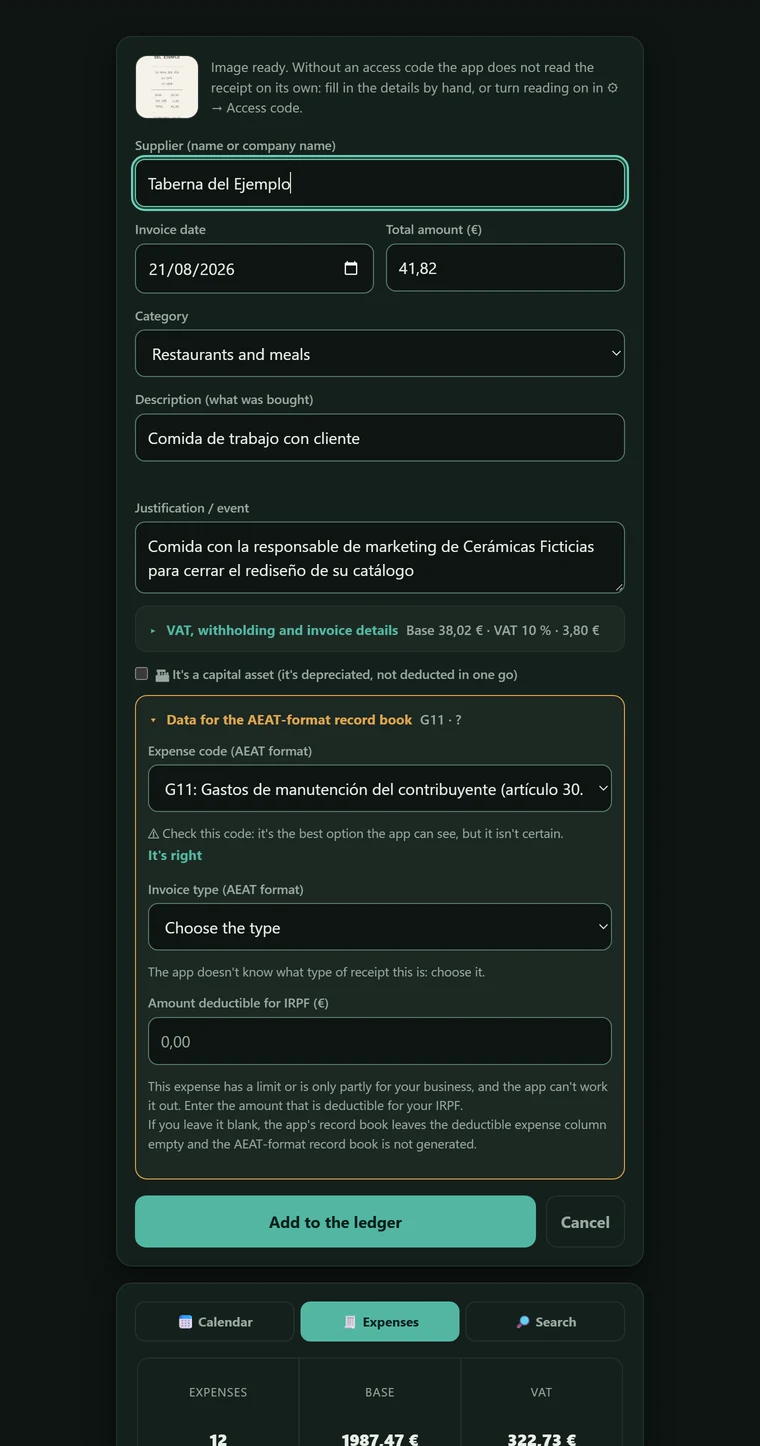
The AI writes in the date, invoice number, supplier, NIF, description, taxable bases and up to three VAT rates, and classifies the expense into one of twenty-five categories. It only writes in empty fields: whatever you have typed yourself is untouchable, even if the read arrives afterwards. If you have the app in English, Catalan or French, the description reaches you written in your language; the documents that go to the Tax Agency always come out in Spanish.
When in doubt, it does not make things up: it leaves the field empty and raises a warning. There are forty-four possible ones, from the receipt with no NIF to the reverse charge, by way of everyday clothing or charging the electric car – which is a vehicle expense, not an office utility. One of them fires when there is more than one supporting document in the same photo: the AI reads one, and the app says so before saving instead of losing the other in silence.
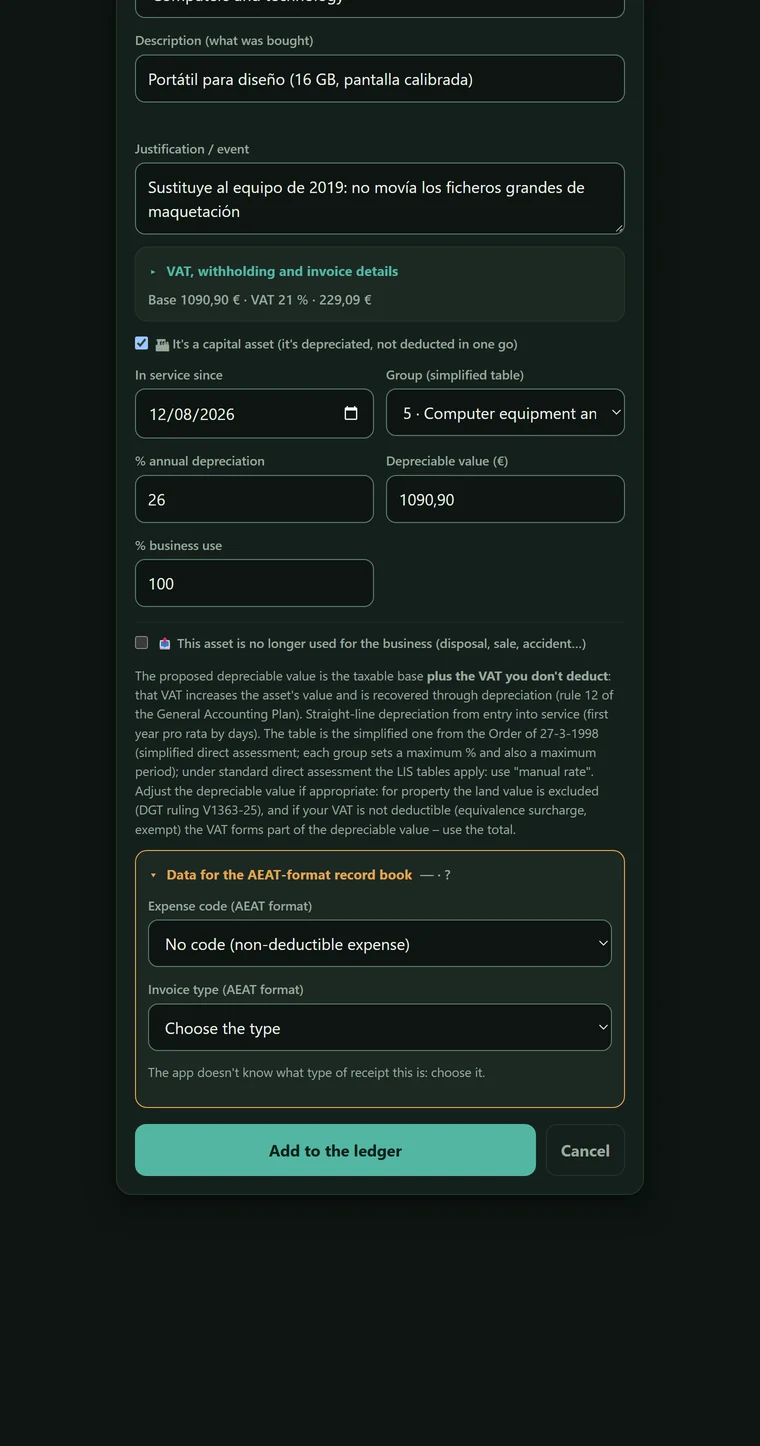
One checkbox – "It's a capital asset" – opens the depreciation schedule: date of entry into service, group in the simplified table, annual percentage, depreciable value and business-use percentage.
The simplified table in the Order of 27-3-1998 has ten groups; the drop-down offers the six that are not agricultural, verified one by one against the BOE (Spain's Official State Gazette): buildings at 3 %, fixtures and furniture at 10 %, machinery at 12 %, transport at 16 %, computer equipment at 26 % and tools at 30 %. The four agricultural ones – livestock, fruit trees, vineyards and olive groves – go in via a manual rate. And it is validated at both ends: too small a percentage would stretch the depreciation beyond the maximum period, and the warning tells you what the minimum is rather than just saying no.
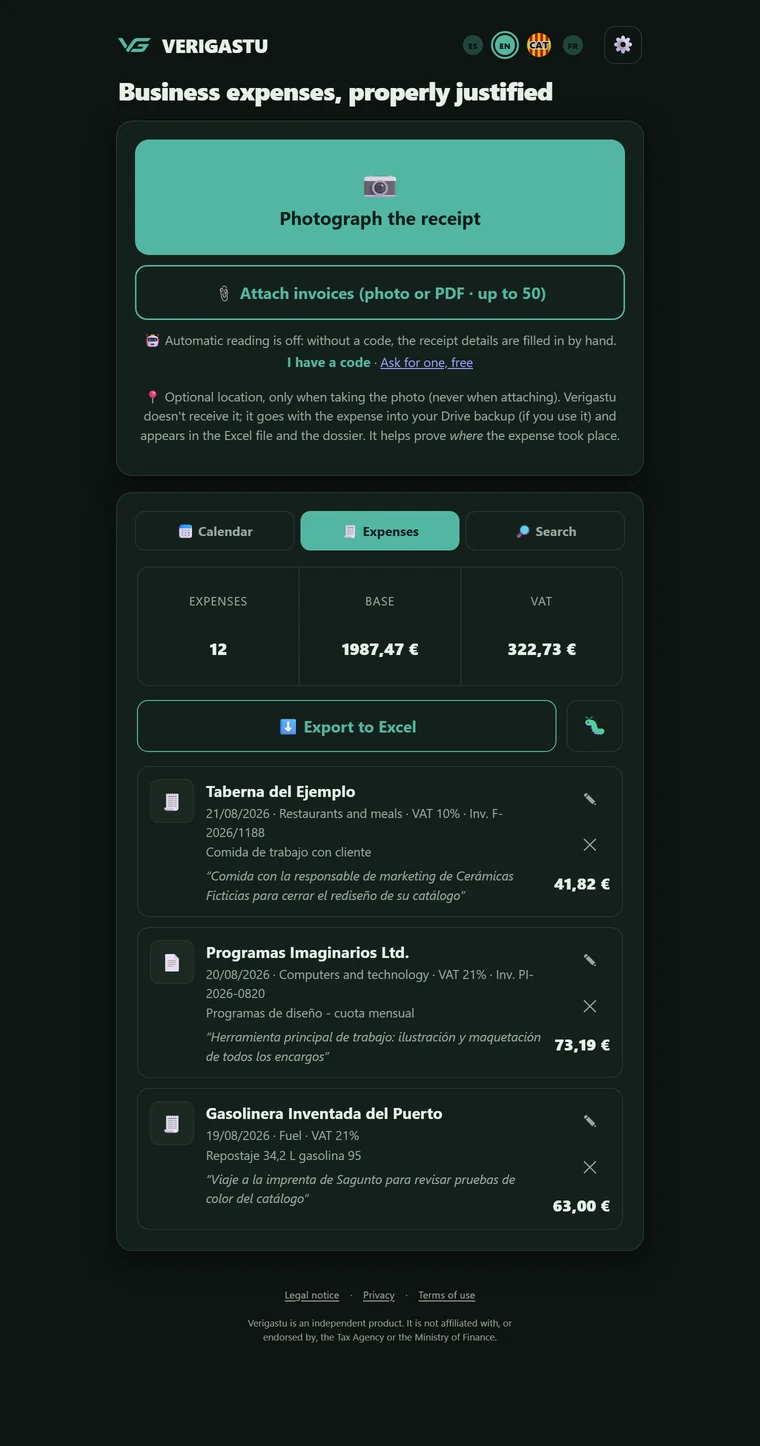
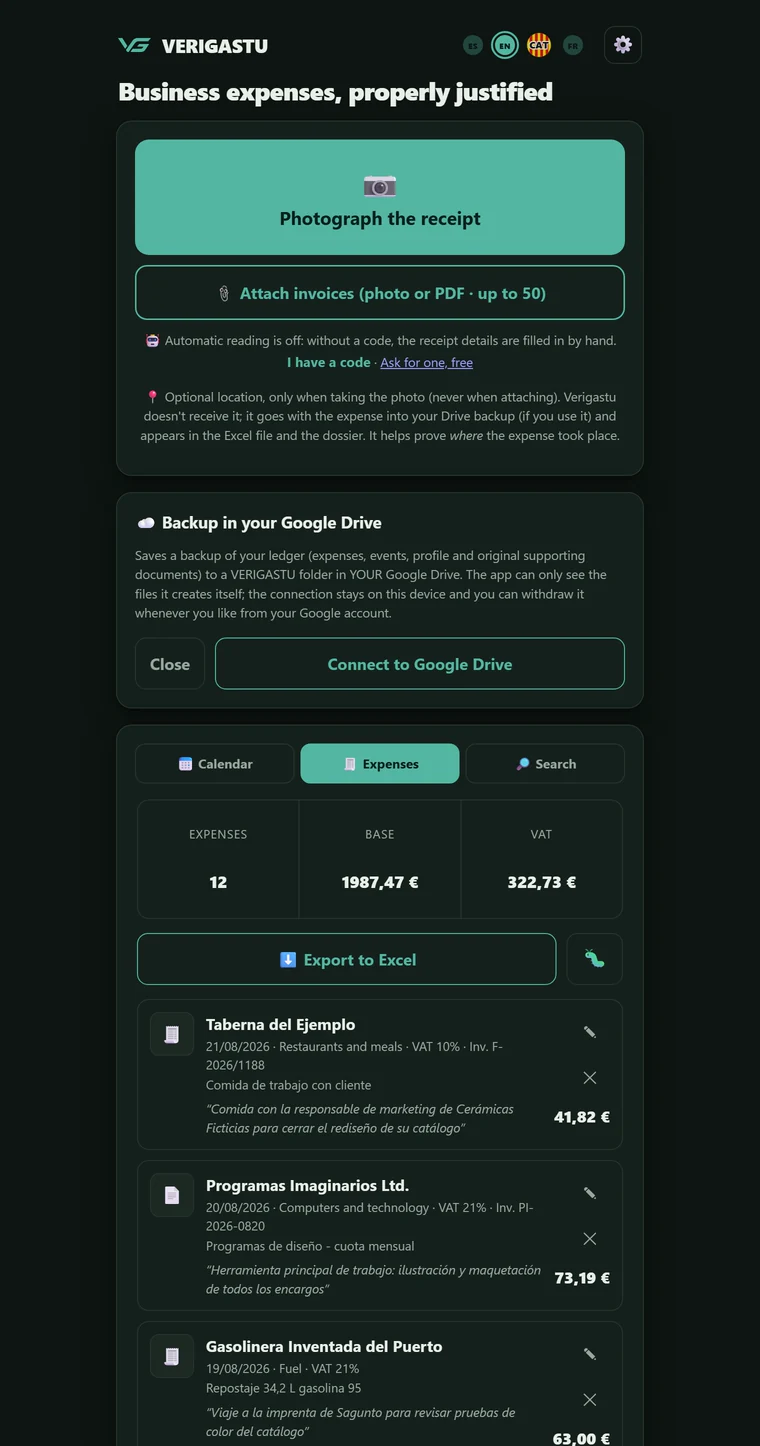
Each expense appears with its thumbnail, its supplier, its date, its category, its VAT rate, its invoice number and its amount. And underneath, in italics and in quotation marks, the sentence you said the day you paid for it.
That is what expense apps don't usually ask you for: the why, said on the day you paid. The search box filters live by supplier, NIF, justification or category; the summary of expenses, taxable base and VAT is always in view; and the calendar marks the days that have an expense with a dot.
If you made a mistake, you correct it; if it should not be there, you delete it. Neither happens silently: every addition, correction or deletion leaves a numbered record that carries the hash of the previous one inside it, and correcting adds a new record instead of rewriting the old one. Deleting asks for a reason from a short list – it was a duplicate, the data were wrong, it was not business-related – and the deletion is recorded without the expense data. What this does and what it does not: if someone tampered with an entry afterwards, or slipped in a new one, it would not add up; but it does not prove when you recorded each expense – the time comes from your phone's clock, and the dossier states this – nor that the expense is real. Those are still proved by the receipt and your explanation.
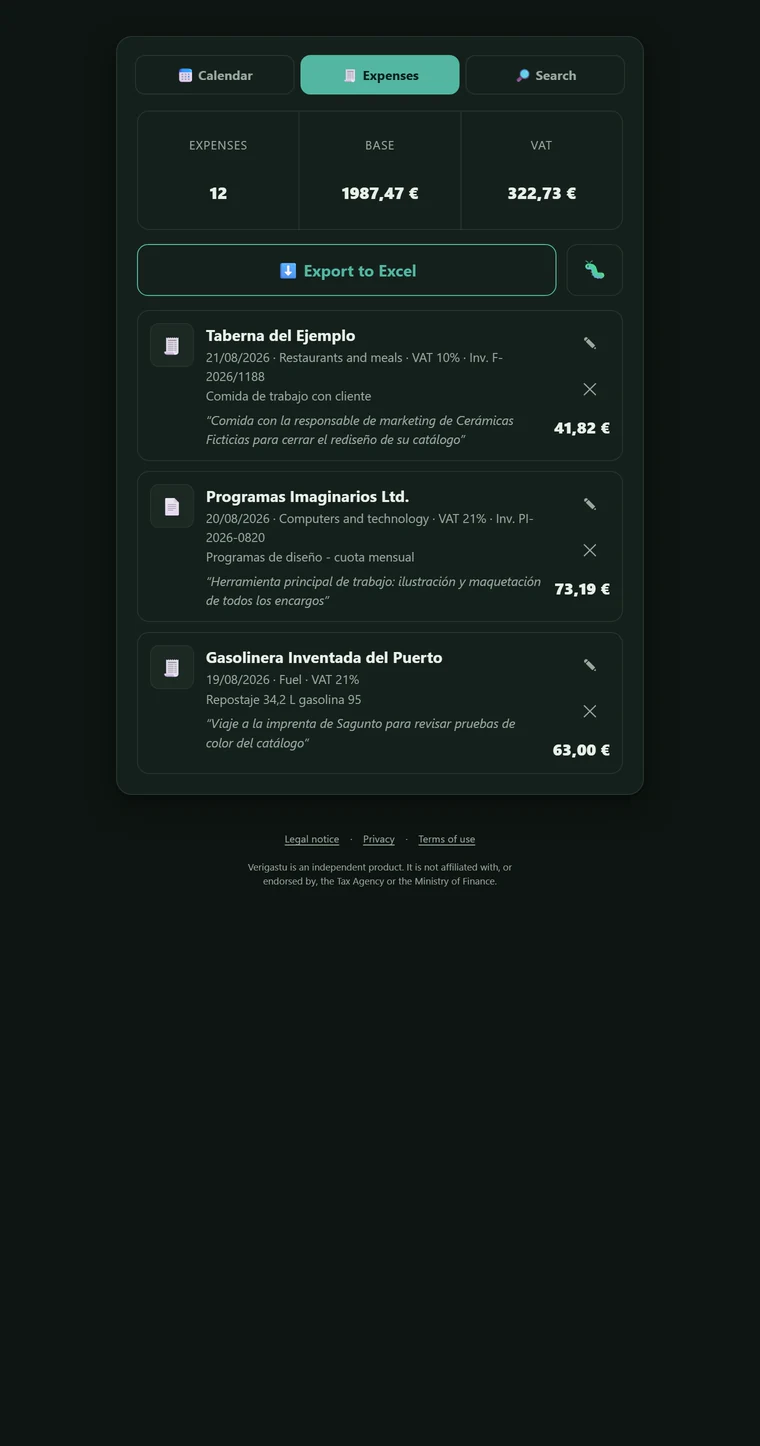
You choose the period – the year or a quarter – and the app builds a ZIP with the explanatory report in Word, with the legal framework, your declared profile, the summary table and the reasoned list of each expense; the period's ledger in Excel, with its Trazabilidad (Traceability) sheet; a COMO-COMPROBAR.txt file with the exact command to verify the hash of each supporting document and, written just as plainly, what that check does not prove; the capture record, if you tick its box; and the folder of original supporting documents, numbered by entry.
The Excel file, the explanatory report and the name of each file all use the same entry number: the whole dossier talks about entry 34. And the closing note is honest: it says whether any attachment is a reduced copy, and which one, instead of pretending everything is there.
If you have capital assets, the ZIP also carries their ledger, and the explanatory report covers those bought in earlier years that are still being depreciated. If your profile says you are a professional under direct assessment, or if you have recorded advances of funds or disbursements in the period, it also carries the advances of funds and disbursements ledger, with the supporting documents for the disbursements. And if you are self-employed under direct assessment and have entered your name, your NIF and your activity details in the profile, it also carries the purchases and expenses ledger in the standardised format published by the AEAT. For that, every expense must have the data that format requires, and you cannot be on the cash basis (collections and payments). If anything is missing, it is not produced, and your accountant can fill it in.
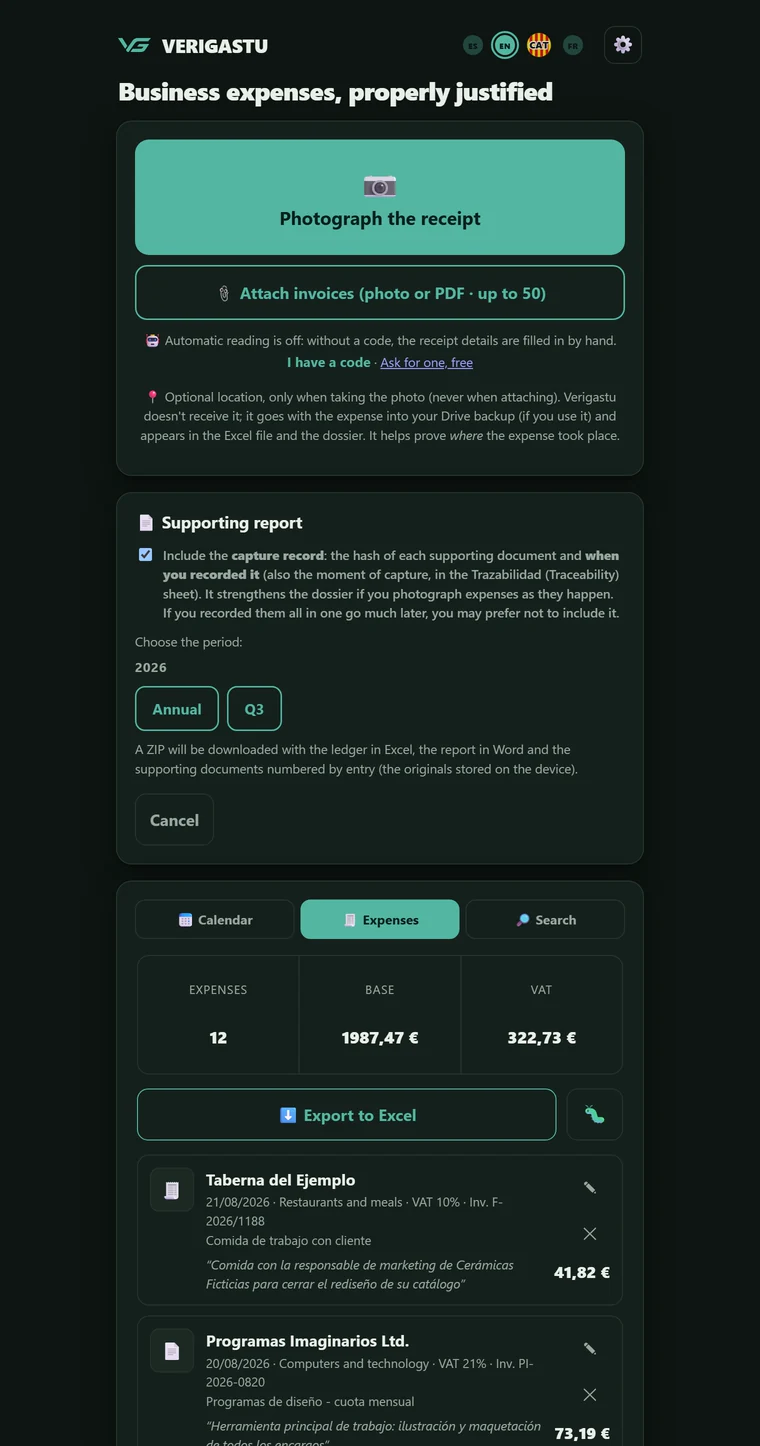
A few seconds after each change, the ledger and the original supporting documents back themselves up to your Google Drive. Not to a server of ours: from your phone to your account.
And with the narrowest permission there is: the app can only see the files it has created itself. It cannot list, open or touch the rest of your Drive, even if it wanted to. On a new phone, connecting the same account and tapping "Restore" brings back expenses, events, profile and supporting documents. Before restoring, the app warns you that it replaces what is on that phone; and if you get it wrong, "Undo the last restore" puts it back as it was just before.
Two screens you will not see here. The AI reading a receipt live and the tax warnings appearing over a freshly read expense are probably what would sell this app best. They have not been captured yet, and we would rather say so than mock up an image that pretends to show something you have not seen working.
What you take away
A single Excel file with three sheets: the IRPF purchases and expenses ledger, with its twenty-one columns; the VAT received invoices ledger; and a Trazabilidad sheet that is not a ledger and says so, with the hash of each supporting document. One line per VAT rate, real dates, autofilter and totals with formulas that Excel recalculates. Built inside the app itself, with no external libraries. If you declare more than one business activity, instead of one file you get a ZIP: the complete ledger and, behind it, the ledger for each activity.
The complete dossier for the period, built in one tap: what an accountant would ask their client for. What is inside, piece by piece, in step 07.
No message says "this is not deductible" without saying why: an article or a binding ruling, verified against the legal text before being added. They warn, never block.

binding DGT rulings catalogued and verified against the legal text
subject areas of the doctrine library, out of 29, with rulings already catalogued
rules in the tax matrix from which the categories, the warnings and the deductible VAT amount the app proposes are derived
different warnings when reading a supporting document, each with its legal basis
Figures for Verigastu · inventory updated on 21/09/2026, taken from the project's code and indexes, not from memory.
The ledgers
Exporting produces a single Excel file with two ledgers – purchases and expenses for IRPF and received invoices for VAT – and a separate Trazabilidad sheet. Art. 62.3 of the VAT Regulations allows it: ledgers kept for other obligations "podrán ser utilizados a efectos de este impuesto" (may be used for the purposes of this tax) if they meet its requirements. One file, two obligations.
The columns listed in art. 3 of Orden HAC/773/2019, in their order, and none that should not be there: the photo's location lives in the Trazabilidad sheet, not inside the ledger. An invoice with two VAT rates is split across two lines without losing any amounts, the deductible VAT amount is kept separate from the input VAT and the withholding has its own column. Whatever you withhold, the app adds up by quarter, with the deadline for paying it in.
The second sheet follows art. 64.4 of the VAT Regulations: reception number, both dates when they differ, who issued it, taxable base, rate and VAT amount. Invoices go in the order you recorded them – which is the order you received them in, as art. 69.3 of the same Regulations requires – and the reception number is stable: recording a late invoice tomorrow does not shift the numbers of the others. Whatever is not an invoice stays only on the IRPF sheet, and both criteria are written in a note inside the sheet itself.
Both sheets close with their totals by quarter and year, because art. 9.1 of the same Order requires that the ledgers "se totalizarán, en todo caso, por trimestres y años naturales" (shall in all cases be totalled by quarter and calendar year). The numbers the tax return then asks for, already grouped.
What is depreciated has its own ledger: the seventeen columns of art. 4 of Orden HAC/773/2019 and, at the end, the invoice total; the year-by-year depreciation schedule using the official simplified table and a record of the asset's disposal when there is one. The acquisition value excludes the VAT that is deducted.
If you are a professional under direct assessment, the rules require one more ledger. Art. 68.5 of the IRPF Regulations puts it like this: "Los contribuyentes que ejerzan actividades profesionales cuyo rendimiento se determine en método de estimación directa, en cualquiera de sus modalidades, estarán obligados a llevar los siguientes libros registros: […] d) Libro registro de provisiones de fondos y suplidos" (taxpayers who carry on professional activities whose income is determined under the direct assessment method, in any of its forms, shall be required to keep the following ledgers: […] d) Ledger of advances of funds and disbursements). Verigastu keeps it separate from the expenses ledger: the advances of funds a client gives you to pay their own expenses and the disbursements you pay in their name and on their behalf, with the invoice made out to that client. Each item carries a number that never changes and the details listed in art. 6.3 of Orden HAC/773/2019, in their order. The ledger comes out in its own Excel file, with totals by quarter and year, and it also goes in the dossier, with the supporting documents for the disbursements. The AEAT does not publish a standardised format for this ledger.
If an invoice carries foreign VAT, the app ticks the "Foreign VAT" box (you can correct it): that VAT is not deductible in Spain (art. 92.Uno LIVA). If it is from another EU Member State and the app knows the VAT amount, it asks whether its refund can or could be requested (Form 360), which it does not handle: if yes, it records only the taxable base as the expense; if you answer no or it does not know the VAT amount, the total. With reverse charge (an invoice without VAT from a supplier not established in Spain), it works out the VAT amount and records it as input VAT and, if your VAT scheme lets you deduct it, as deductible VAT.
No cell is filled in with an invention: what the app cannot know is left empty with a warning next to it, with its article or its binding ruling. The ledger you hand over also says what it is missing, which is exactly what an accountant would want to know. And each supporting document carries its SHA-256 hash in the Trazabilidad sheet: whoever receives the dossier can check that the document is exactly the one that was recorded.
With two, three or four business activities there is no single ledger: there is one per activity, because art. 9.4 of Order HAC/773/2019 requires that you keep "libros independientes para cada una de ellas" (separate ledgers for each of them). Shared expenses are split using the percentages you set – the app proposes none, because the rules lay down no split criterion between activities – and appear in each ledger with the full taxable base of the invoice and with their share in the deductible expense column: letters e) and f) of art. 3.1, which the Order already keeps apart. An activity without a single expense also gets its ledger, at zero and with a note saying why: a missing ledger reads like a hidden one.
A multi-page invoice is sent to the AI whole, not just its first page: the base, the VAT amount and the withholding are usually on the last one, and that is where they are read from. How many pages it saw is written in the Trazabilidad sheet, so that whoever receives the dossier can check at a glance that the attached document is complete. That number is declared by the one that saw the pages, not counted over the bytes of the PDF: an invented figure in a dossier is worse than an empty cell, and the sheet itself says so in those words.
Privacy
It is not a policy, it is the architecture. With no database of ours holding your expenses or your supporting documents, there is no file of your receipts that anyone could steal from us.

Verifactu
The name is similar, so it is worth clearing up early. Verigastu is not Verifactu, not from the Tax Agency, and not invoicing software.
The Tax Agency's verifiable invoicing system: it requires the software you issue your invoices with to meet certain traceability and integrity requirements, and the maker to sign a declaration of conformity.
Today, according to the BOE (Royal Decree-Law 15/2025): companies, 1 January 2027; the self-employed, 1 July 2027. On 5 October 2026, the Ministry of Finance (Ministerio de Hacienda) announced that it plans to postpone it until October 2028, to coincide with mandatory electronic invoicing; until that is published in the BOE, the 2027 dates apply. Invoicing with Word or Excel does not, on its own, put you outside the regulation: according to the Tax Agency (AEAT), if you only use them to create, print and keep your invoices, it does not affect you; if they also produce your ledgers or your accounts, it does. The DGT is more cautious: in its view, only invoices written by hand are clearly outside it.
It asks you what you issue your invoices with and warns you according to your answer, citing the binding ruling that applies to your case. And it keeps your expenses ledger – the invoices you receive – along with the capital assets ledger and, if you are a professional under direct assessment, the advances of funds and disbursements ledger. It does not keep the income ledger.
It does not issue invoices, does not number them, does not sign them and sends nothing to the AEAT. If you need Verifactu-compliant invoicing software, you need another product – and Verigastu sits alongside it without any problem.
The dates and criteria the app cites are verified against the consolidated text of the rule before being added. What cannot be verified is left empty rather than filled in by inference.
Questions
No. Verigastu is an independent product. It is not affiliated with, or endorsed by, the Tax Agency or the Ministry of Finance. The name resembles Verifactu because it works with the same subject matter – your ledgers – not because it has any relationship with the tax authorities.
What we have done is a test anyone can repeat. The Agencia Tributaria has a public service for checking the IRPF purchases and expenses ledger in the standardised format it publishes. On 12/10/2026 we ran a test ledger through it, generated with Verigastu's code and with made-up data, and it answered «Fichero validado» (file validated), «Fichero válido para RENTA» (valid for income tax) and «Fichero válido para Persona Física» (valid for an individual). That means that file had no format or code errors. It does not say whether your expenses are deductible or whether your amounts match your invoices, and it does not guarantee that your ledger will pass: that depends on your data. It is the IRPF ledger, not the VAT one. It is not an approval.
No, and that is a decision, not a gap still to be filled. Issuing would turn the app into a computerised invoicing system subject to Verifactu, maker's declaration of conformity included. We would rather integrate with those who have already crossed that line and do well the part almost nobody covers: the expenses ledger and its evidence.
There is no installer, no App Store, no system requirements. You open the link in the email on your phone – it already carries your code – and it is up and running. And if you want it as a proper app, it has its own button inside: menu ⚙ → 📲 Install the app – on Android the browser installs it with one tap, on iPhone it shows you the two Safari gestures. That adds it to the home screen and it behaves like an application, with its own icon and full screen. On iPhone, install it before you start recording expenses: the app on the icon keeps its data separately from Safari.
On your device. Expenses, photos and profile are saved on the phone itself, and the backup – if you switch it on – goes to your Google Drive, not to a server of ours. The only moment a supporting document leaves the phone is when the AI reads it, and it is not stored at the other end.
You choose the period and download the complete dossier: explanatory report in Word, the period's ledger in Excel, the capital assets ledger if you have any, the advances of funds and disbursements ledger if you are a professional under direct assessment or have recorded advances or disbursements in the period, instructions for checking the hashes, capture record if you tick its box and original supporting documents numbered by entry. If your profile and your expenses have the data required, it also carries the ledger in the AEAT format (the details are in step 07). It is still your adviser who decides how to respond.
If you are on the general scheme and apply the general pro rata (art. 104 LIVA), you enter each year's percentage your accountant gives you in ⚙ → My tax profile. The ledgers deduct only that part of the VAT amount, and what is not deducted goes to the expense or to the asset's value. The app does not handle the special pro rata, the adjustment of capital assets in the following years or differentiated sectors.
No. Verigastu is a support tool based on published DGT criteria; it does not replace the advice of a tax adviser. It warns and explains, but never blocks or decides for you, and all its legal citations are verified against the text of the rule before being added.
AI reads are bought in prepaid bundles that never expire; the prices are published at verigastu.com, with VAT shown separately. The trial code is still free, with no card and with free reads included: you request it on the same site. The code usually reaches your inbox in a few minutes; on some very busy days, the next day or, exceptionally, a few days later. And without reads the app keeps working by hand, with the ledger intact.
Yes. This page is the shop window; to get into the app, request your code at verigastu.com. The form is there, and that is where access is explained.
And now
If it fits, the next step is on the other website: that is where you request the access code and where getting in is explained. Here we ask nothing of you.
verigastu.com · The code usually reaches your inbox in a few minutes; on some very busy days, the next day or, exceptionally, a few days later.
Answers generated by AI from the product documentation. It can get things wrong and is not tax advice. What you type is processed by an external AI service to answer you, so do not type personal data, yours or anyone else's; there is more detail in the privacy policy.